Key Takeaways:
- SNMP stands for Simple Network Management Protocol, an application-layer protocol used to manage and monitor network-connected devices.
- SNMP monitoring collects data from routers, switches, servers, printers, and applications, including traffic, errors, packets, and connection speed.
- SNMP monitoring software uses probes, MIBs, OIDs, maps, alerts, and SNMPv3 security to spot performance issues faster and improve network visibility.
What is SNMP?
SNMP stands for "Simple Network Management Protocol." It’s an application layer protocol included in the internet protocol suite, a set of the most commonly used communication protocols online.
SNMP originated in the 1980s at the time when organizational networks were growing in both size and complexity. Today, it’s one of the most widely accepted protocols for network monitoring. Here’s a look at how SNMP works and why it matters to network professionals.
How is SNMP Related to Network Monitoring?
Network monitoring is the process of collecting and analyzing network performance data. This also includes network mapping that provides a live, visual inventory or the devices connecting to a network.
As SNMP is the most widely accepted protocol for network monitoring, SNMP monitoring software allows IT pros to easily get performance information from their network devices. This information ranges from activity, errors transmitted and received, to connection speed.
What is SNMP Used For?
SNMP is used to collect data related to network changes or to determine the status of network-connected devices. Collecting this data can help IT professionals keep their finger on the pulse of all their managed devices and applications. Every device within the network can be queried in real time with SNMP, TCP, and other types of network probes for their performance metrics. When thresholds for certain values are exceeded, software can alert system administrators of the issue, allowing them to drill into the data and troubleshoot a solution.
How Does SNMP Monitoring Work?
All day, traffic is ebbing and flowing across your network as users conduct transfers, browse, perform downloads, and more. SNMP talks to your network to find out information related to this network device activity. For example, it tracks bytes, packets, and errors transmitted and received on a router, connection speed between devices, or the number of hits a web server receives.
SNMP works by sending messages, called protocol data units (PDUs), to devices within your network that “speak” SNMP. These messages are called SNMP Get-Requests. Using these requests, network administrators can track virtually any data values they specify. All of the information SNMP tracks can be provided to a product that asks for it. That product can either display or store the data, depending on an administrator’s preferences.
How Does Intermapper Monitor SNMP?
For IT departments looking to harness the power of SNMP, it's imperative to have a network monitoring tool that’s up for the task. SNMP monitoring tools can run automatic discovery on the network and interrogate devices to extract exposed data, which facilitates monitoring comprehensively across all devices.
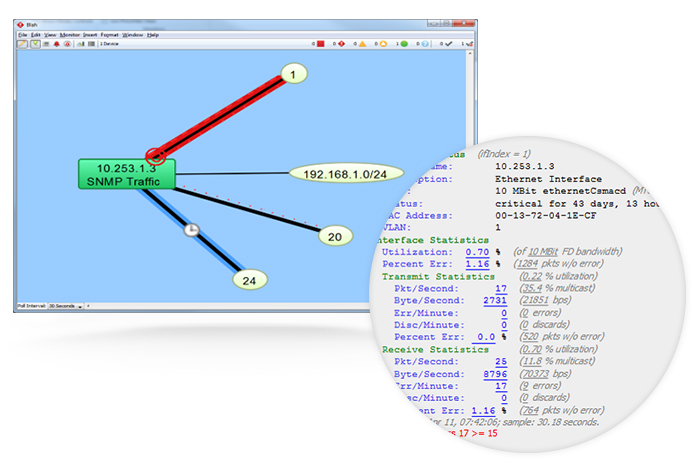
Intermapper uuses SNMP probes to query network devices for their management information base (MIB) variables. SNMP needs access to MIBs and their associated object identifiers (OIDs) in order to interrogate devices and read data. As a leading network monitoring software choice, Intermapper has hundreds of built-in network probes to give you a wide variety of data about your network performance. And it works with the latest protocol version, SNMPv3. Users also have the ability to create their own custom probes. This enables SNMP-speaking devices to deliver device status updates in a way that enhances the overall quality of network monitoring and management.
Out of the box, Intermapper comes with all kinds of general and vendor-specific probes, including:
- Basic OID
- Comparison
- High, Low, or Range Threshold
- Restricted Interface
- Single OID Viewer
- SNMP High PPS
- SNMP High Traffic
- String Comparison
- Table or Trap Viewer
- And more!
If you need a different SNMP probe, check out our user-contributed probes library. Customers constantly share custom SNMP probes and other types of probes for the whole Intermapper community to use.
You can also create your own custom SNMP probes.
TRY SNMP MONITORING WITH INTERMAPPER
SNMP Examples: Five Basic SNMP Commands
SNMP uses five basic messages to allow the SNMP manager and SNMP agent to communicate:
Trap: The SNMPTRAP command is a common way for devices to send alerts. These are asynchronous messages sent to the manager by an agent when something needs to be reported. A storage appliance, for example, might send a trap to the manager when it loses access to a drive. Other examples include a power-up situation or high-traffic notification that should be evaluated.
But SNMP managers don't have to sit around waiting for agents to send a message. They may prefer to ask for data proactively. This ensures devices are still active and functioning properly. Without a proactive check you may not know if a quiet device is offline or simply doesn't have anything to report.
- Get: The SNMPGET command retrieves one or more values from the MIB (management information base).
- Get Next: The GETNEXT command retrieves the next corresponding value of the OID (object identifier) in the MIB tree.
- Get Response: The GETRESPONSE command is used by the agent to send back the values of actions requested by the SNMP manager. If a manager wants to ask an agent for data with a get message, the agent will send back a get-response. The manager might only need that one piece of data, or it can then send a get-next message (and then another, and another) to request a full status update.
- Set: The SNMPSET command is used by the SNMP manager to tell an agent to take action. Some agents control relay outputs that can be toggled. Others have beacon lights, backup systems, thermostats, and other settings that can be changed with a set command.
SNMP Components & Architecture
In order to effectively monitor network activity, SNMP relies on an architecture consisting of the following:
- Managed devices: From printers and workstations to resources like routers and switches, there are many devices within an organization’s network that have to be managed and monitored. Managed devices can be configured with SNMP nodes that allow them to interface with other network components.
- Agent: Overall SNMP management relies on a system of local device information being collected and transmitted. This happens via agents, programs that are tied to local devices with the purpose of collecting, storing, and signaling the presence of data from these environments.
- Network management station: This is the base that is shared between agents and SNMP managers, and it provides the memory and processing functionality to fuel network management.
Together, these components gather information to bring back to the network requester.
Two Types of SNMP Configurations
SNMP uses read and read-write community strings to share information. Both can be configured to allow public access or set to prevent unauthorized changes.
- Read: The read strings can be read by any application or device that can speak SNMP.
- Read-Write: The read-write SNMP string can allow a user to set or manipulate values such as a device’s settings.
SNMP Protocol Versions
- SNMP v1: This is the default version of SNMP created in 1980s. It’s considered the least robust of the options. SNMP v1 supports low-level security and sends data “in the clear” without encryption. This version was designed to support 32-bit counters, which limits the type of data it can return.
- SNMPv2: Created in the 1990s, SNMPv2 revised version 1 and improved performance and security, but it doesn’t use encryption. It also introduced new ways of retrieving larger amounts of data using Getbulkrequest and added an option for 64-bit counters to support larger interfaces (e.g., 10Gb).
- SNMP v3: The newest version uses the base protocol functionality with added cryptographic security to enhance data privacy and authenticity capabilities. This provides a more enhanced version of the protocol best suited to secure access to devices and improve performance.
SNMP Monitoring Benefits
You need a way to manage all your network devices. It can be overwhelming to try to manage it all, especially if you have a small network team, or if you have a rapidly-growing network.
Monitoring software for SNMP helps capture information about how your SNMP-enabled devices are performing. Most devices speak SNMP, and this could include everything from network equipment and servers to printers and applications.
A monitoring tool can also help with inventory and asset management and security.
Lastly, a reliable SNMP monitoring tool helps anyone reliably monitor large quantities of data from a single console with limited resources—even if you're a one-person IT team. More efficient monitoring can give you peace of mind, knowing you can monitor traffic in real time, identify performance slowdowns, avoid bandwidth and server performance issues, spot trends, and improve the overall health of your network.
Try SNMP Monitoring with Intermapper
See What's Happening. Understand Why. Plan What's Next.